Your Silicone Prosthesis and It’s Care
Sometime back, we were shown a brochure in the clinic entitled “Your Silicone Prosthesis and It’s Care.” It was clearly made a long time ago, and it was put forth that maybe someone would take on re-doing this brochure. I started to take on the project, but the scope of what was wanted changed, and it was decided to leave things as is for now. Since I’d already put in the effort of rewriting it I wanted to go ahead and share those words here. At some point I’d like to go ahead and finish with the design despite the change in plans at our own clinic and make it available as either a poster or downloadable brochure for anyone to use across any clinic. In the meantime, this is just the content, and perhaps some of you reading will have suggestions about how to make it better before I move into the design aspect.
**note – The title “Your Silicone Prosthesis and Its Care” comes directly from the original brochure.**
_____________________________________________________________________________________________________
Your Silicone Prosthesis and It’s Care
What is a silicone prosthesis?
A silicone prosthesis is a silicone replacement for a missing, underdeveloped, or disfigured body part. Silicone itself is an inert synthetic compound. It is used widely across a variety of industries including cookware, toys, and medicine. We use it in anaplastology because of it’s flexibility, durability, lightweightness, and capacity for color blending and translucency.
How long can I expect my prosthesis to last?
Wear and tear on a prosthesis is to be expected. Colors will change over time, silicone will tear, and the fit may even change, especially in growing children. In general, one can expect a silicone prosthesis to last one to three years. This estimate is of course greatly impacted by the environment to which the prosthesis is exposed.
Contributing factors
There are a number of contributing factors to how quickly a prosthesis will degrade. Sun exposure is one. As with most things, the sun can fade the coloring of your prosthesis. Outdoor wear in general can be a problem if you are in particularly dusty or grimy places. Smoke filled rooms are also problematic, as is smoking in general. Over time the smoke will stain the prosthesis. Around children or animals it is generally advised that you exercise caution in where you leave your prosthesis when you are not wearing it.
General Care
Attention to cleaning and storage (when you are not wearing it) of your prosthesis will help extend the amount of time between replacements. Your prosthesis should be taken off every night before bed and washed by hand with mild soap and warm water.. When not in use, store your prosthesis away from heat and sunlight. Avoid unnecessary handling, and airtight containers.
The Attachment Site
Whether your prosthesis is retained with adhesive, by implants, or anatomically, special care must be taken in cleaning the attachment site on the prosthesis as well as the skin around where the prosthesis sits.
An adhesive retained prosthesis requires careful removal of the adhesive from both the prosthesis and the supporting skin.
An implant-retained prosthesis requires careful cleaning around the metal of the prosthesis, and also the attachment site where it connects to you. A solution of saline and hydrogen peroxide is advised for cleaning the skin around protruding abutments.
An anatomically retained prosthesis simply requires general cleaning of both the prosthesis and skin.
Regardless of the type of attachment, you should always pay attention to the surrounding skin and report any changes to your doctor or anaplastologist. If you have any questions regarding proper care for your prosthesis please do not hesitate to ask your anaplastologist.
Mural in North Chicago
One of my classmates, Jeremy Brotherton, was involved in painting a mural this week. Can you spot the medical artist contribution?

Size Comparisons
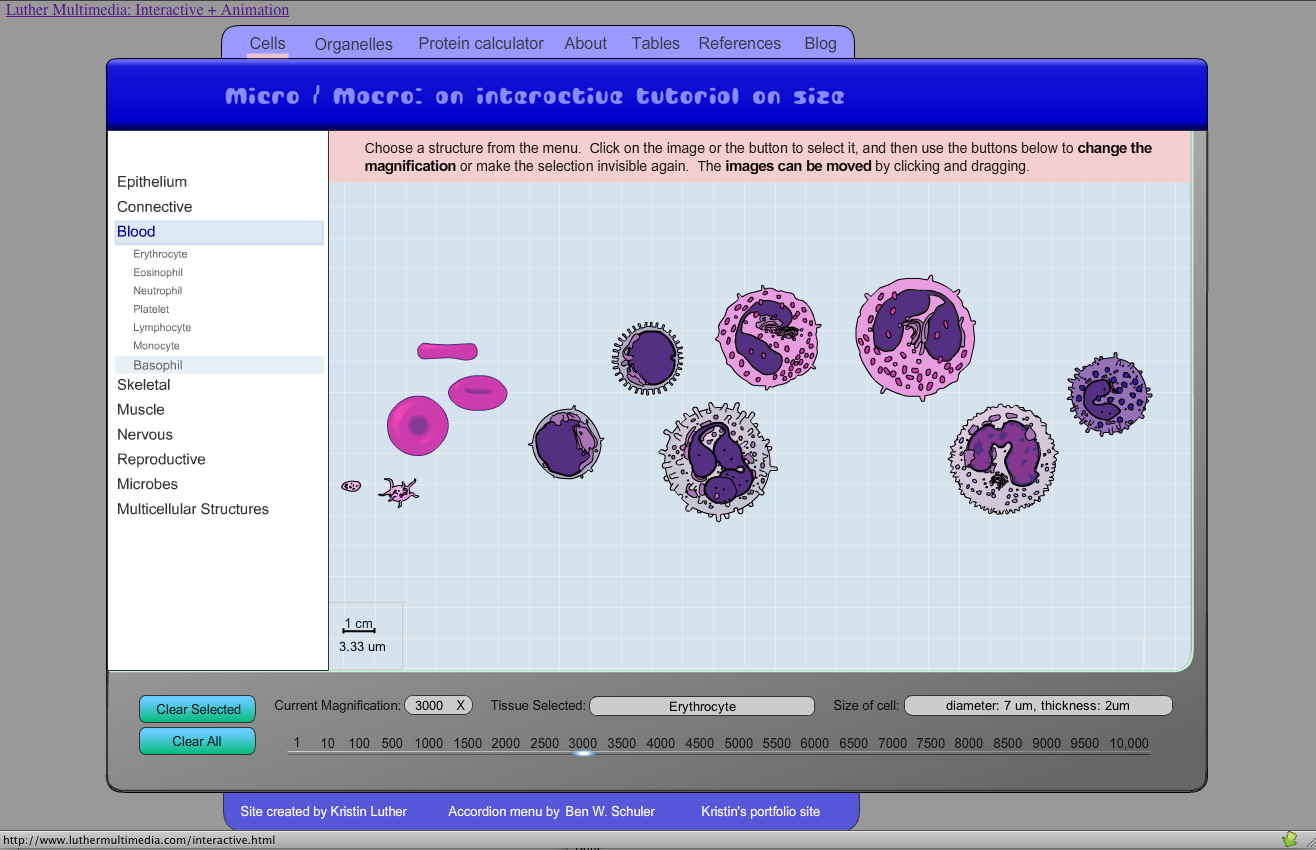
I was looking for this recently. It’s a Flash interactive for size comparison in micro and macro anatomy.
http://www.luthermultimedia.com/interactivepages/MicroMacroPage.html
It was created by Kristin Luther, and it’s pretty awesome.
It, along with some of her other fine creations can be found here.
http://www.luthermultimedia.com/interactive.html
Currently I’m working on a Maya project where you get a brief fly through a blood vessel and see the different types of blood cells along the way. I needed a proper size comparison to work from in populating my vessel with cells. I searched and searched, and well no one makes it as clear as Kristin does.
Two Cool Things
#1 – My Autodesk software is officially up and running again with all of the proper licenses in place. Ahhhhhhh.
and #2 – My classmate’s patient today turned out to be the patient I met the day that I came to interview with the biomedical visualization program at UIC. How cool is that?! I recognized him right off the bat, and after I said something he said he remembered meeting me. His was the first implant-retained prosthesis I had ever seen in person, and today he came in to replace the one I saw him get a little over two years ago. How neat!
And now, back to working in 3DsMax for my project research. I’ve spent a lot of time cleaning up a CT scan I took of a plastic skull to work from, and now it’s time to make it reflect the pathology of the condition I need to represent.
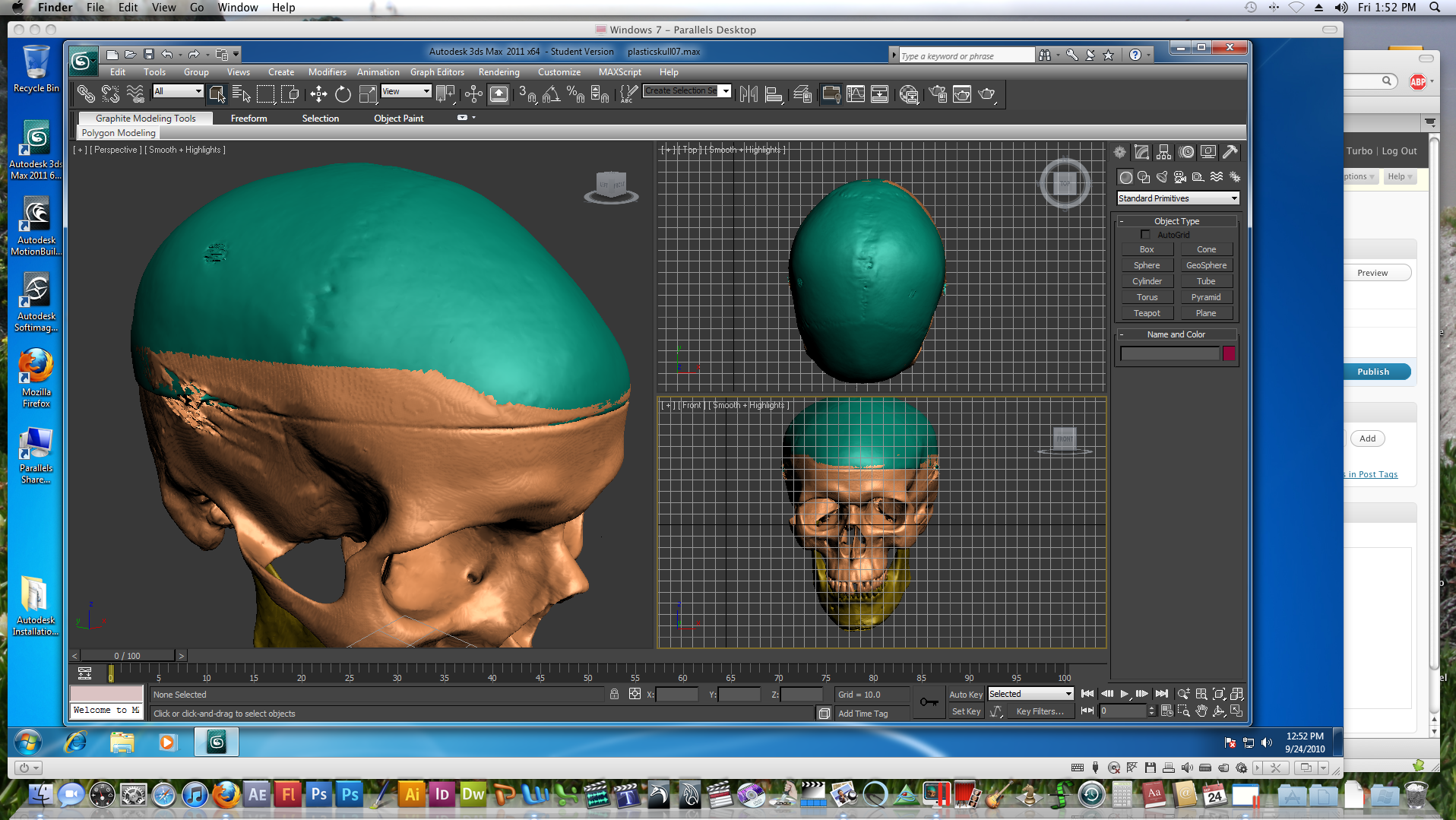
Yup, this week has just been far better and more productive than last week. That’s for sure.
My First Patient
**This post has been removed. While it did not contain images of the patient, it did contain images of the auricular prosthesis that I made, and underlying acrylic substructure. It spoke of my enjoyment in working with a patient for the first time, and of how an acrylic substructure works in an implant retained prosthesis. It spoke of intrinsic and extrinsic coloring.
I have been asked to broaden my interpretation of PHI (personal health information) to include any images of any prosthesis made for a patient as well as any materials in development for a prosthesis (ie mixed color samples, or an acrylic substructure). I will try to find ways to speak about these processes in a more strictly theoretical capacity and without images in the future.
My apologies to those reading for the lost post. It was mostly about my enthusiasm in working for a patient for the first time. And it was also about working under someone new and therefore getting to soak in some new ideas and ways of doing things that I hadn’t been exposed to yet. **
First Anaplastology Patient
**This post has been edited to remove any reference to the patient’s appointment dates in order to better protect anonymity**
So, here’s a touch of exciting. Yours truly will be seeing her first patient in the anaplastology clinic (yes, it’s news exiting enough to speak of myself in the 3rd person!)
I have the acrylic substructure ready.
I have my colors as ready as they can be without actually meeting my patient yet. I’ve been matching to the recorded colors in his box.
This evening I did a test paint into a bit of the original impression. It looked good. I think I’ll need to bump up the reds when I do the real thing, but I’m feeling pretty good about all of this.
I’ve even learned to say “Good morning” and “My name is Sara” in Polish, so I can say a couple of things to him without the interpreter.
I’m totally excited. Day one is XXXXXX, and I have a follow up the following day. This one is for real!
Skulls!
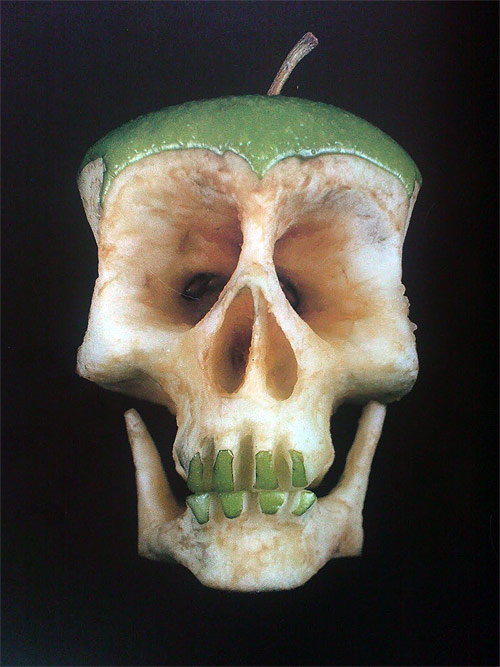
Ok, so I saw this over at Street Anatomy and it made me happy…

It is by Russian artist, Dimitri Tsykalov.
I myself have been playing around with skulls again lately. There is the skull I am working with in 3DsMax, and also my latest pocket skull I sculpted amidst the crazy of all the tech support it took me to get back to my digital 3DsMax skull.

Lately I prefer making these little guys without the mandible so that I can put in all the little foramina underneath.
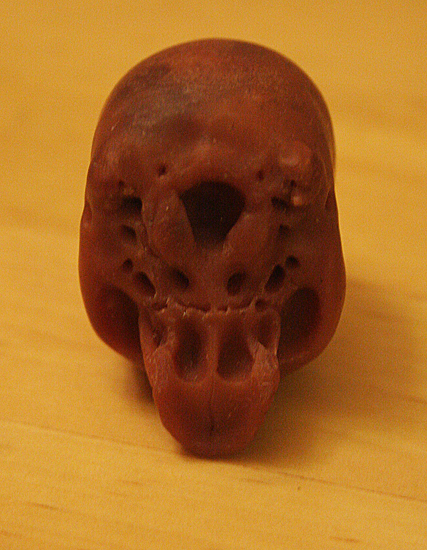
Unfortunately with this one, I broke the left styloid process before I got around to photographing it or reproducing it. Honestly though, I can make a better skull than this. Hopefully I’ll find the time to do another one soon, because I think if I did another one while this one is still fresh in my mind, it could be really cool, and that one would be worth reproducing in resin.
So many things to do, so little time.
Autodesk (continued)
Today was supposed to be the day I finally gave up on my ongoing saga to get my Autodesk software up and running on my machine. Instead, it was a breakthrough day. After loosing a week to technical support insanity, today I finally got somewhere with it all. It turns out the error message I was receiving on the Mac end of my computer was in fact the error itself, and could be ignored. Amidst all the other trouble, that possibility hadn’t even occurred to me. And I also reinstalled Parallels and Windows 7, and this time it all seems to be working. I made it a point this time to upgrade Windows before installing 3DsMax. I don’t know if that made a difference or not, but it did open for me later. I am however stuck running the trial version until I can get another license. The bad install went through as my one activation, so now I have to chase the right people down to get a new one to keep the program running. I even got an honest apology from one of Autodesk’s student technical support advisers. He also said that getting the trial version up and running was indeed a good sign and that I should be good to go now once I get the license. For any of you dealing with your own similar crisis out there I can tell you now that Windows 7 64-bit Home Edition will support 3DsMax. I think it may not be optimal for those who are networking their computers together, but as far at getting it up and running in the first place goes, the home edition is just fine. Anyway, I’ve been working in that today and cleaning up the skull scan from last month for my upcoming animation. It is good to be making progress with that again indeed.
Autodesk Nighmare
Well, it would appear that that last bit of enthusiasm for 3DsMax was undeserved. I worked in it for about two hours and have not been able to access the program since. I am at present, a week behind in work from working my ass off on trying to fix this. Autodesk has so thoroughly disappointed me with their technical support for students that I can’t help thinking I should have just pirated it. I don’t see that I’ve gotten anything more than extra hassle for the money I’ve paid.
The installation support line is 918-747-9333.
They will tell you right off that they don’t do technical support though and since their regular guy is out, you get Doug.
Doug is at 918-770-0164.
I haven’t been able to reach Doug so far today. He may have simply given up on talking to me. I don’t know.
The regular guy I can only reach by email and I don’t know his name. He thinks I should try this on different computers, but I can’t because I don’t have a room full of computers capable of running this stuff, and even if I did, my licensing is only toward one machine. That’s the student license deal. You only get one. That’s why I bought this new computer. I wanted it to be that one.
That guy also recommends Autodesk Customer Service at 1-800-538-6401, and I have spoken to them. I may get a replacement sent to me. But they can’t help me establish if that is the problem or not.
He also sent me to Autodesk Registration at 1-800-551-1490. There a man named Rain sent me to the Douglas Stewart Co. This was supposed to resolve any activation problems.
See I thought I might be having an activation problem now, because today I uninstalled everything from the Windows side of my computer including Windows and Parallels in the hope of starting over completely. I was told that the problem may be my version of Windows. I can’t exchange my version of Windows now, but I could buy a new one outright and see if that works.
By the way, the Parallels support number is 888-811-2489.
So after uninstalling *everything* on the Windows side I attempted to install on the Mac side of the computer the two programs that were working on the Windows side, Mudbox and Maya. Mudbox loaded up just fine, but Maya keeps failing on exit, whatever that means. So I suspected that the serial number was the problem and that it was showing the previous registration on the Windows side of my computer which according to Parallels shouldn’t have worked in the first place because of my Windows version and which now does not exist.
So getting back to the Douglass Stewart Co., they actually don’t handle anything of the sort. The woman there could only give me the installation support line 918-747-93333, which is the number I started with in the first place.
I’ve probably spent the most amount of time with the people working for Parallels from India. Their phone system is a little shaky, but two of the people I’ve spoken to over there have been very helpful. Just no one seems to be able to fix the problem. They are the ones now recommending that I purchase Windows 7 64-bit Professional instead of the Windows 7 64-bit Home edition I currently have. I did research that before purchasing in the first place, but nothing online indicated that one would be better than the other so long as I was in 64-bit. But the disks, now that I have them, do suggest Windows 7 Professional 64-bit (now that I have opened them), so maybe that is the problem there.
But regardless, Maya now won’t install on the Mac side of my computer, which has nothing at all to do with Windows, and points back at the Autodesk software possibly being corrupt. Or perhaps my previous attempts to install have now done something to make this not work. I currently have Mudbox up and running, and that’s all I seem to be able to get. I am currently waiting on a phone call back from someone named Barbara who may or may not tell me anything useful.
I’m quite certain I sound like a complete lunatic to anyone answering the phone at this point, and they would probably be right to think that. Presently I need a shower, and I need to eat something, but I can’t seem to get around to either while I have all this in front of me. It’s almost been a full week since I installed all of this, and it still isn’t working, and I still don’t know why, and I still can’t get the help I need.
This has become such a nightmare.
The Periodic Table of Videos About Elements
It may not be anatomy, but it is science, and a really nice display…
http://www.periodicvideos.com/index.htm